
Stop forgetting
what you study.
A spaced repetition tracker that turns every study session into the right next review. Log the topic, rate the difficulty, and let the schedule adapt—no flashcards required.
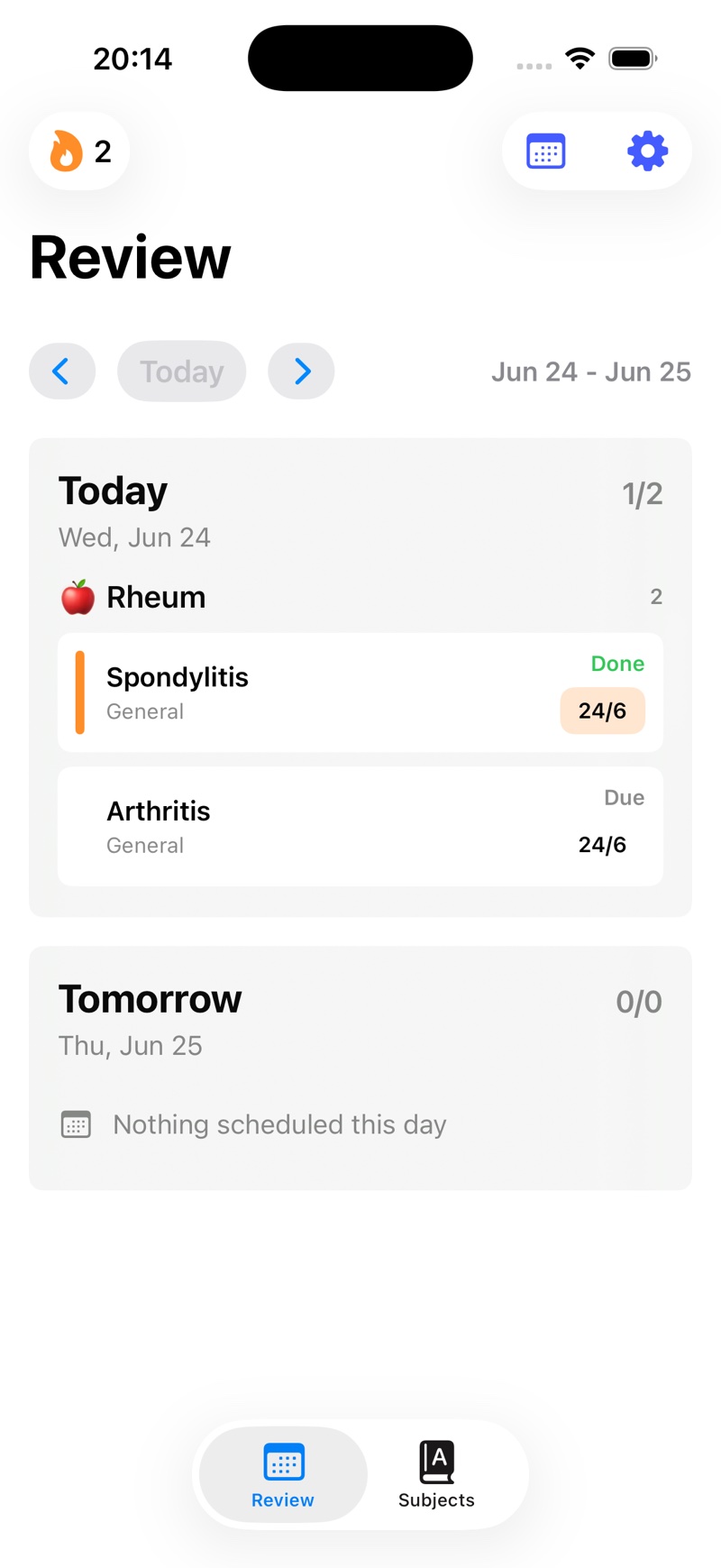
One review queue. Every way you learn.
From “I studied this” to “I still remember it.”
The app turns difficulty into a schedule, so the planning happens naturally after the work.
Organize the material
Create subjects, groups, and focused topics that match your course or curriculum.
Study and rate recall
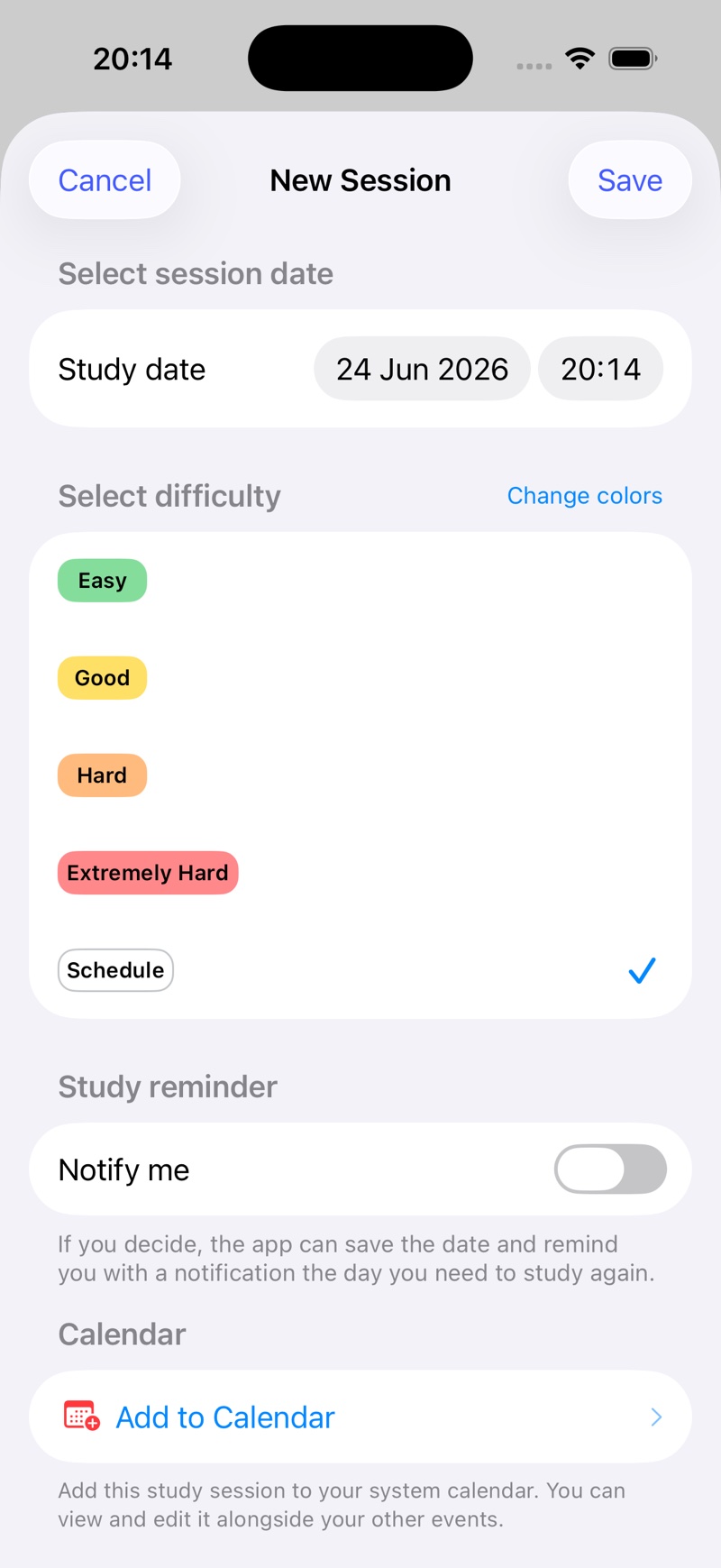
After a session, choose Easy, Good, Hard, or Extremely Hard. Honest effort is the signal.
Return at the right time
SM-2 adapts the next review. Your Review screen always shows what needs attention next.
A study planner that listens to your memory.
A fixed timetable treats every topic the same. Spaced Repetition Tracker uses the proven SM-2 feedback loop to react to how each session actually felt.
Easy
The interval grows. Spend time where it matters more.
Good
The schedule advances with a useful amount of challenge.
Hard
The topic returns sooner while the gaps are still clear.
Extremely Hard
The interval tightens so the foundation can be rebuilt.
Built to disappear into your study routine.
Fast logging, clear review dates, and an iOS-native interface that keeps the next action obvious.
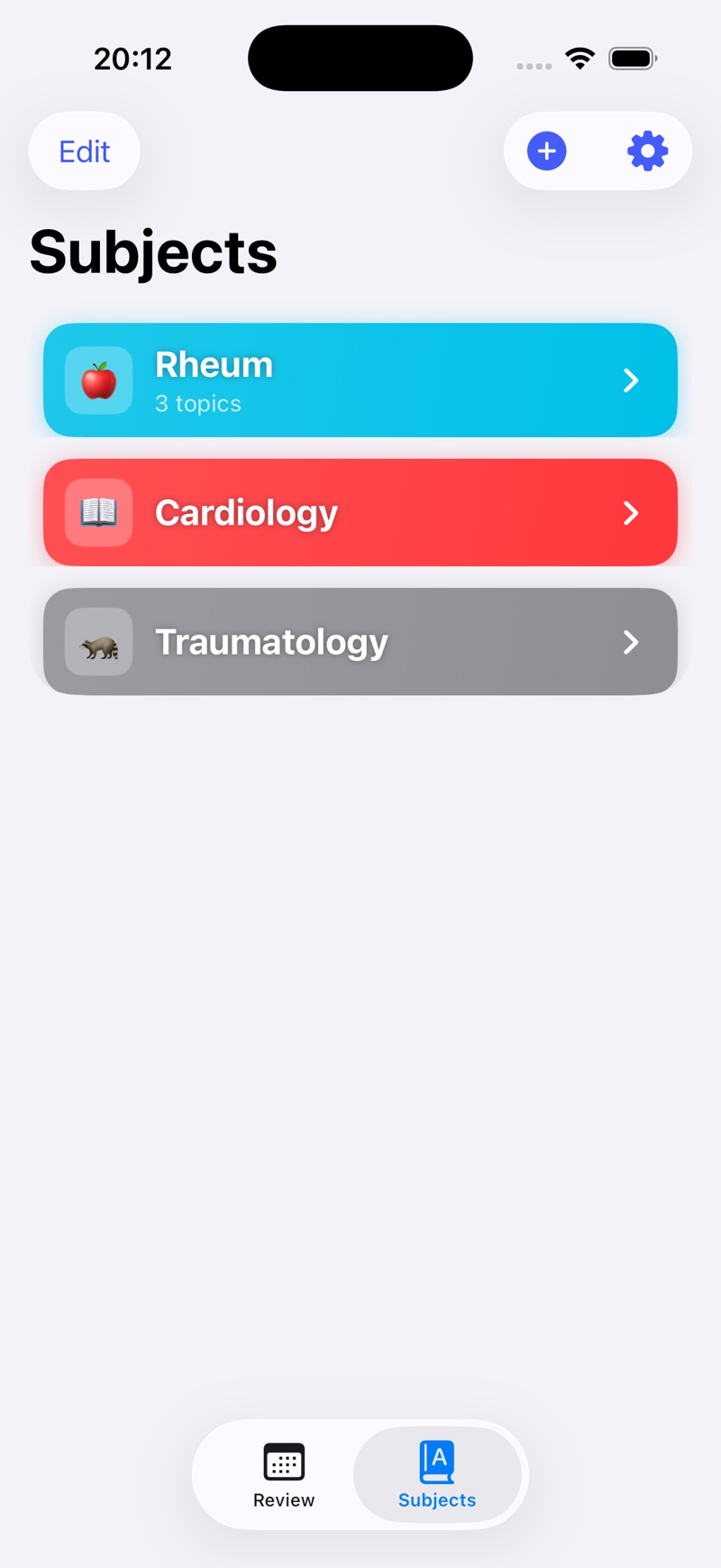
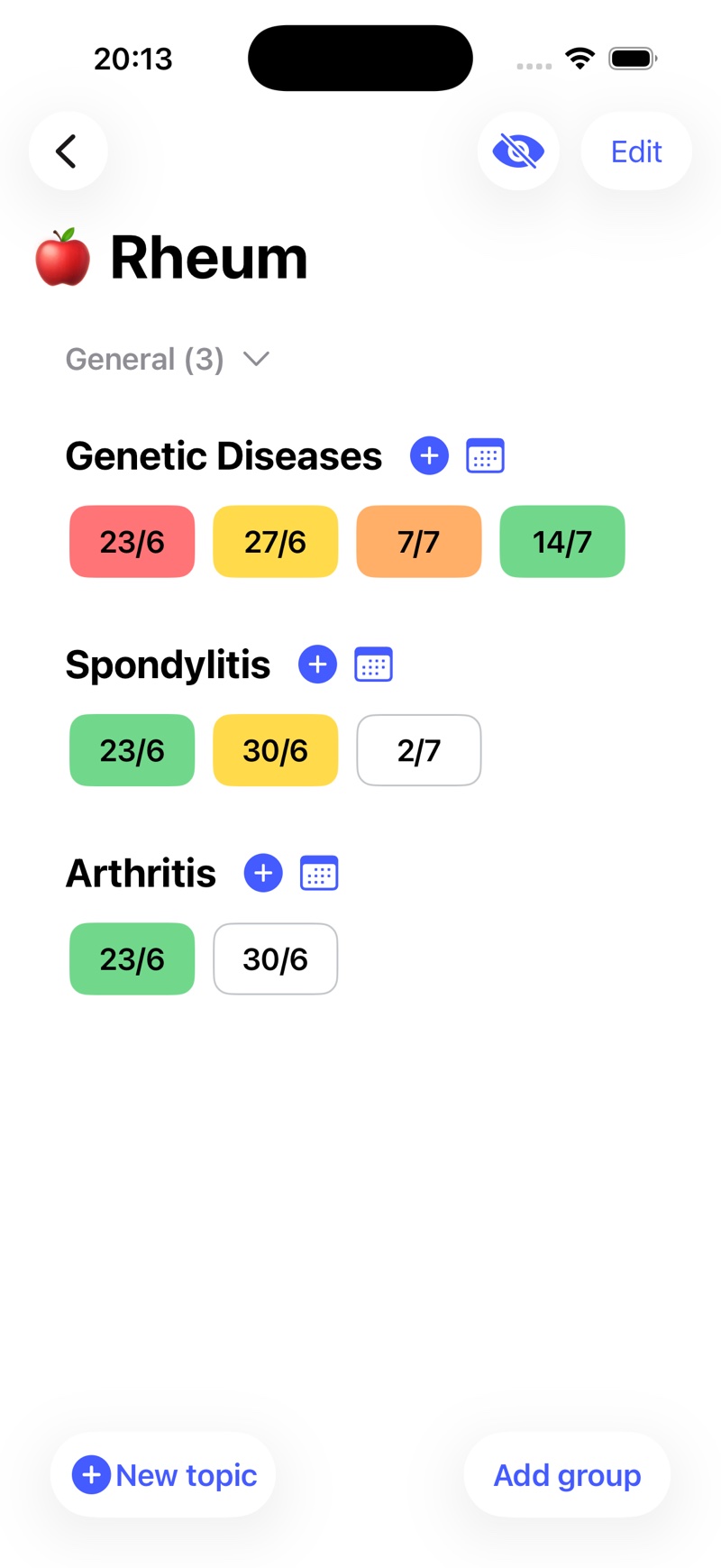
Organize every subject
Keep courses, topics, and progress in one focused place.
See every review date
A visual timeline makes the next repetition concrete.
Know what is due
Open the app and start. No daily timetable rebuild required.
Log difficulty in seconds
Your rating updates the next review automatically.
Your study history becomes the plan.
Every subject keeps its own schedule, topics, sessions, and progress—while Review brings all due work into one simple queue.
Calendar & session history
See what you studied, what is due, and how each topic has progressed over time.
Reminders that match the plan
Use notifications, system calendar events, and iOS widgets to keep reviews visible.
Multiple subjects, one queue
Track an entire curriculum without mixing the structure of each course.
Three scheduling modes
Choose Smart SM-2, fixed intervals, or predefined and custom review plans.
Any retrieval method
Use practice questions, notes, textbooks, videos, cases, or flashcards.
Streaks without the guilt
See consistency at a glance while keeping the real focus on due topics.
iCloud sync
Keep study records available across your Apple devices through automatic iCloud sync. Sync timing depends on Apple and your account connection.
Backup & Restore
Export or restore your study data and available attachment files using a backup archive.
Calendar your way
Choose an available calendar, customize event details, and keep linked review events updated when reviews change.
Turn the method into a routine.
Practical guides to understanding the method, planning your reviews, and preparing for your next exam.
Best Spaced Repetition Apps for iPhone: 2026 Comparison
Compare AnkiMobile, RemNote, Brainscape and Spaced Repetition Tracker for iPhone. Choose flashcards, notes or topic reviews to fit how you study.
Read guideHow Spaced Repetition Works
Learn how spaced repetition supports long-term recall and can focus study time by scheduling reviews around what you remember.
Read guideHow to Use Spaced Repetition: A Simple System That Sticks
Learn how to use spaced repetition step by step, choose review intervals, and build a study routine you can run with Spaced Repetition Tracker.
Read guideHow to Build a Spaced Repetition Schedule Without a Spreadsheet
Build an adaptive spaced repetition schedule for any subject and learn when to review using smart, fixed, or custom study intervals.
Read guideSpaced Repetition for Exams: Turn Your Syllabus Into a Review Plan
Use spaced repetition for exam preparation: map your syllabus, prioritize weak topics, schedule reviews, and avoid last-minute cramming.
Read guideSpaced Repetition for Medical School Without Building More Flashcards
A practical spaced repetition workflow for medical students using lectures, question banks, clinical cases, and existing notes—without making another deck.
Read guideSpaced repetition FAQ.
Short answers, plus a focused guide when you want the full workflow.
What is a spaced repetition tracker?+
A spaced repetition tracker records when you study a topic and schedules the next review after a delay. Spaced Repetition Tracker uses your session difficulty to adapt that delay, helping weaker topics return sooner and stronger topics wait longer.
Learn how spaced repetition worksHow do I make a spaced repetition schedule?+
Create small, reviewable topics, log your first session, and choose an adaptive, fixed, or preset schedule. With Smart Algorithm enabled, each Easy, Good, Hard, or Extremely Hard rating changes the next review date.
Build your review scheduleIs this an Anki alternative?+
It is an alternative for learners who want spaced repetition without making flashcards. Use your existing textbook, notes, question bank, videos, cases, or flashcards; the app tracks the topic and tells you when to return.
Compare the no-flashcard workflowCan spaced repetition save study time?+
It can make review more targeted by bringing difficult topics back sooner and spacing familiar material farther apart. The time saved varies by person and subject; it does not guarantee a fixed reduction.
See how spaced repetition worksCan I use spaced repetition for exam prep?+
Yes. Organize your syllabus into testable topics, retrieve before rereading, and let difficult topics cycle back sooner. Close to the exam, you can switch to a preset or custom plan that fits the remaining days.
Plan spaced repetition for examsHow do active recall and spaced repetition work together?+
Active recall is what you do during the session: retrieve without looking. Spaced repetition is when you repeat that retrieval. The app schedules the timing; you choose the best recall activity for the material.
Combine active recall and spacingDoes the app work for medical or law school?+
Yes. Topics can represent conditions, mechanisms, rules, cases, or issue clusters. Log question-bank sessions, case practice, outline recall, or any other study activity without duplicating your material.
See the medical school workflowWhat is the SM-2 algorithm?+
SM-2 is a classic adaptive scheduling algorithm. It uses recall quality, a repetition count, the current interval, and an ease factor to decide when a topic should return.
Understand the SM-2 algorithmDoes my study data sync between devices?+
The app syncs study data through iCloud when iCloud is available and enabled. Sync is managed by Apple's system and may take time; the app also includes a separate Backup & Restore option for exporting and importing a backup file.
Learn how to use the appGive every study session a next step.
Download Spaced Repetition Tracker and turn what you study today into what you still remember later.

Free to download • Premium features available